September 22, 2026 15 min read reproducibility
How I Organize Research Projects When Working with AI Agents
The folder layout, a few plain files and some small Claude Code hooks that I use to keep a research project reproducible when much of the code is written by an AI agent.

I have never been good at keeping my research projects organized. Every project starts with one clean folder and a clear question, and a few months later there is an analysis_v2.py sitting next to an analysis_v2_fixed.py, a figure called h2_final_FINAL.pdf that I am no longer sure how to regenerate, and an output/ folder holding results from ideas I don’t remember having. If you have done any computational work you have probably opened a folder like this (and if it was someone else’s, xkcd already said what you were thinking).
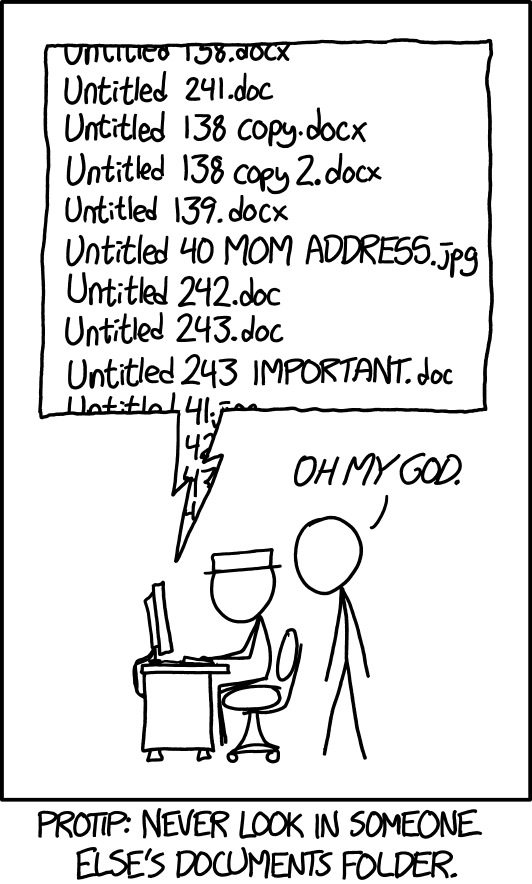
xkcd #1459, “Documents,” by Randall Munroe (xkcd.com/1459, CC BY-NC 2.5). Replace the Word files with analysis scripts and this is most research repositories I have seen, including mine.
For a long time this was a problem I could live with, because I was the only one making the mess and I remembered (more or less) what I had done the week before. That changed over the last year. Most of my analysis code is now written together with Claude Code, an AI coding agent, and it has made me a lot faster. It has also made the mess grow a lot faster, because the agent doesn’t remember anything from one session to the next. Every session starts fresh, looks around the repository, makes reasonable choices, and leaves some files in places that the next session knows nothing about.
After a few months of working this way I had all the usual problems and two new ones that worried me more. In one case the agent had written its own version of a function I already had, slightly differently, and two of my analyses were using two definitions of the same quantity without anything saying so. In the other, the agent started arguing for the opposite of something we had checked and settled weeks earlier. I have made both of these mistakes myself at some point, so I don’t hold it against the agent, but they are exactly the kind of mistakes that end up in a paper if nobody catches them.
So I started writing down rules, first as instructions for the agent and then, when the instructions turned out not to be enough, as small scripts that enforce them. That collection is what I call the Lab Standard. It is public at github.com/anshu957/lab-standard and I use it for all my projects now. I have tried to explain everything from the beginning, since I think many scientists are starting to use these tools without much software background (I didn’t have much either), and the side notes have more detail for anyone who wants it. I will use one project for almost all of it, so there is always something concrete to point at.
The example project
The project is behavioral genetics in mice. We record mice from the BXD panel (a few dozen inbred strains descended from the same two parent strains) and track keypoints on their bodies from video. Then we run keypoint-MoSeq, a model that splits the continuous stream of movement into short, reused units of behavior called syllables, things like a rear, a turn, a pause or a bout of grooming, each lasting a fraction of a second 11 12 . For each strain we compute how often each syllable is used, and then ask how much of the variation in that usage across strains is genetic. That fraction is the heritability, usually written .
MoSeq has a stickiness parameter, kappa, that sets how long the model prefers to stay in one syllable before switching. Change it and you change how finely behavior gets cut, so every downstream number is really “at this kappa.”
Computationally it is a very ordinary project. There is raw video and keypoint data that should never change, model fits that take hours on the cluster, a small number of core computations (syllable usage, heritability) that everything else depends on, and a steady stream of conclusions, some of which will turn out to be wrong.
What the agent is, briefly
Before going on, it helps to say what a coding agent actually does, since most of what follows depends on it. Claude Code is a language model that has been given some tools: it can read files, run shell commands, write code and look at the output, and it does this in a loop until it thinks the task is done. If I ask it to “compute syllable usage per strain and plot it,” it will look through the repository, write a script, run it, fix whatever breaks, and give me a figure.
Everything the agent knows during a session is in its context window, which is just the text it can currently see: my messages, the files it has opened, the output of the commands it has run. The model has no memory that carries over from yesterday, and when a session ends its context is gone.
The size is measured in tokens (roughly, pieces of words). Current windows hold a few hundred thousand tokens, which sounds like a lot until a single long log file eats a good part of it.
So a normal week can go like this. On Monday a session helps me compute syllable usage and, since nothing told it where things go, saves a script called usage_v2.py at the top of the repository. On Wednesday a new session, which has never heard of Monday’s, makes the heritability figure and names it h2_final_FINAL.pdf. On Friday another new session needs syllable usage again, doesn’t know that a function for it already exists, and writes one from scratch. Each session did its job reasonably well, but the project got a little worse each time because nothing connected them. Does this sound familiar?
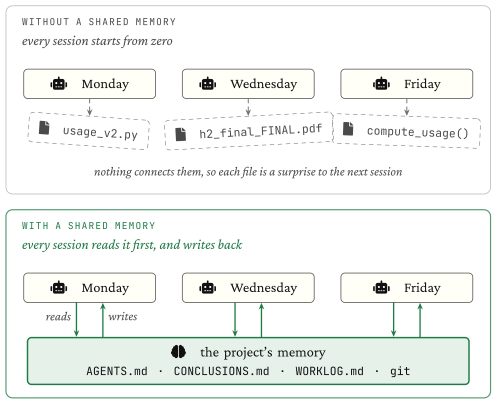
Top: each session starts from zero and leaves its own files behind. Bottom: every session reads the same project state first and writes back to it, so what carries over lives in the repository.
The basic fix is to move the memory out of the agent and into the repository. If the project carries its own description and its own history, it doesn’t matter much that each session forgets, as long as each session reads that first. This isn’t a new idea (Anthropic writes about it as context engineering, meaning deciding what goes into the model’s window and when 5 ). What took me a while to learn is that “the agent should read this first” only works most of the time, and for a research project most of the time isn’t good enough. I come back to this in the section on hooks.
Why one place for everything helps
Since I was trained as a physicist, the way I think about project mess is as entropy, and the analogy is actually useful here. Boltzmann’s formula says the entropy of a system counts how many microscopic arrangements are consistent with what you observe from outside:
where is the number of those arrangements. Now take a single new file in the MoSeq project, say the script that computes usage. If there are no rules, it could reasonably go at the root, in scripts/, in analysis/, in output/, next to the data, or in a new folder named after today’s date. So is large, and anyone who opens the repository later (me in six months, or a new agent session tomorrow) has to search all of those places.
If instead there is one rule, that a run lives in experiments/exp-NNNN_slug/ and nowhere else, then and there is only one place to look (and , which is the closest to zero entropy any of my repositories has come). I think this is most of what a project layout does. The exact folder names matter much less than the fact that there is only one answer to “where does this go?”
The other half of the analogy is that disorder grows by itself and order needs continuous effort to maintain. Nobody decides to make a messy project. It is what happens when nobody is spending effort on keeping it tidy, and an agent that writes a lot of code quickly makes it happen faster. So the effort of keeping things tidy also has to be at least partly automatic, and most of what follows is my attempt at that.
In my projects the mess came in (at least) three forms, and each needed a different fix. The first is files and outputs ending up wherever the session happened to put them. The second is the same computation written twice and then slowly drifting apart. The third, which I didn’t expect, is conclusions drifting: the agent, in a new session or deep in a long one, starts asserting the opposite of something the project had already established. After a quick look at the project map, I’ll take them one at a time.
A map of the project
The first piece is a file at the root called AGENTS.md. It is a page or two of plain text that says what the project is, where things live, what must never be touched, and how to start a session. AGENTS.md is a convention that several coding agents now read by default 6 . Claude Code reads a file called CLAUDE.md instead, so mine contains a single line, @AGENTS.md, which pulls in the same file. That way there is one description of the project no matter which tool opens it.
The folder layout it describes is mostly borrowed. The split between raw data and derived results comes from Wilson and colleagues’ Good Enough Practices 1 , the installable package and numbered notebooks come from Cookiecutter Data Science 4 , and on top of that there are three files whose only job is to be the project’s memory: AGENTS.md, CONCLUSIONS.md and WORKLOG.md. I’ll get to each of them below.
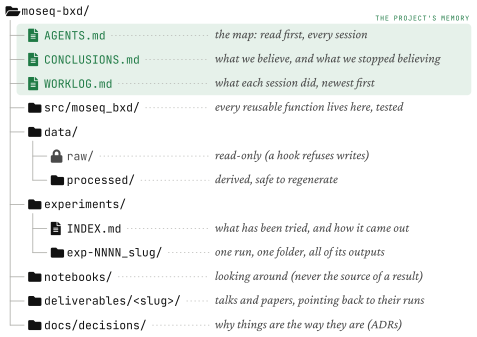
The whole project with one line on what each part is for. The three highlighted files are the project’s memory, and every session reads them before writing anything.
The most useful part of AGENTS.md turned out to be a short section I call the directory contract, which says for each folder whether it can be read, written, or must never be touched. In the MoSeq repository it reads, in part:
- `data/raw/`        -- READ ONLY. Original inputs. Never modify, overwrite, or delete.
- `src/moseq_bxd/`   -- Reusable, importable, tested library code. Add new utilities HERE.
- `experiments/`     -- One folder per run: `exp-NNNN_slug/`. All new run code + ALL its
                       outputs go inside its own folder.
- NEVER write scripts or outputs to the repo root, or create a new top-level directory.
I wrote this for the agent, but after a few weeks I noticed it was also the clearest description of my own project I had ever written. Having to explain the structure to something that takes every word literally made me decide what I actually meant by it.
One run, one folder
The rule that takes care of the first kind of mess is simple: everything a single run produces goes into that run’s own folder. The config, the script, the metrics, the figures, and even the SLURM log files that the cluster writes when a job crashes at 3 a.m., all of it goes into experiments/exp-0012_h2-by-syllable/ and nowhere else. (A skill, /new-experiment, creates the folder with all of this already in place.)
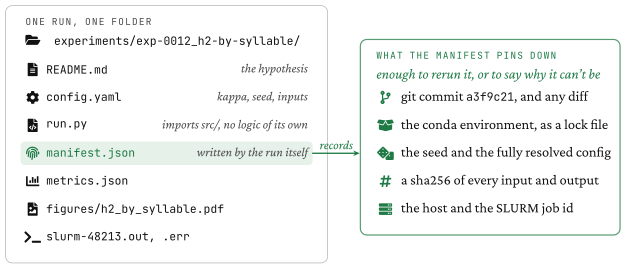
The contents of one run folder. The manifest is written by the run itself and records enough to reproduce it, or at least to explain why it can’t be.
The reproducibility part comes from manifest.json. Every run writes one automatically. It records the git commit of the code (plus any uncommitted changes, as a diff), the exact conda environment, the random seed, the fully resolved config, a sha256 hash of every input and output file, and the machine and SLURM job it ran on.
A hash is a short fingerprint of a file’s contents. Change one byte and the fingerprint changes completely, so two matching hashes mean you have the very same file and not just one with the same name.
Where I have felt this most is imagining the reviewer email. Six months from now a reviewer asks why syllable 23 has an of 0.41 in Figure 3. Without the manifest my honest answer would be “let me try to remember which kappa that was.” With it, I open the figure’s folder and read off the commit, the kappa, the seed and the exact keypoint files it used, and I can check those files against the hashes. Sandve and colleagues’ ten rules for reproducible research are mostly this same idea said ten ways 2 (record every step, keep exact versions, save the seeds). The manifest just does it, so nobody has to remember.
Each run also starts with a short README.md, written before the run, stating what I expect to see. It is a small habit, and I’m not sure it always works, but it is the cheapest protection I know of against sliding from “testing an idea” into “looking for a result.” It also gives experiments/INDEX.md (one line per run, what was tried and how it turned out) something to link to.
Shared code lives in src
The second kind of mess is the one that actually cost me a result. The core computations of the project, like loading keypoints, computing syllable usage and estimating heritability, are ordinary Python functions in a small package, src/moseq_bxd/, which every experiment imports. I try to keep them pure, meaning the same inputs always give the same output and nothing depends on hidden state, which makes them easy to test.
This is what happened anyway. Early on I had syllable_usage() in src/moseq_bxd/usage.py, which counts how often each syllable starts, so usage means the fraction of syllable instances. Months later a new session, asked to compare usage across strains for a new experiment, didn’t look in src/ and wrote its own compute_usage() inside exp-0014/run.py. Its version counted frames, so usage meant the fraction of time spent in each syllable. Both are sensible definitions, but they give different numbers (a long, rare syllable scores low on one and high on the other), and for a while exp-0009 and exp-0014 both reported “usage” and disagreed, with nothing in either file to say why.
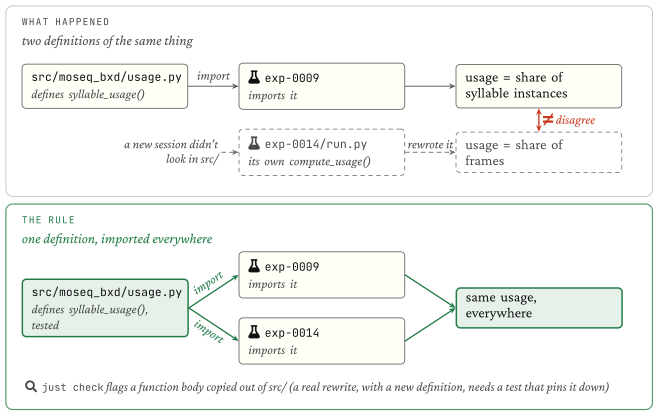
Top: a second definition of “usage” written inside an experiment quietly disagrees with the one in src/. Bottom: both experiments import the same function.
I have two defenses against this, and neither is complete on its own. The first is an instruction: AGENTS.md tells every session to search src/ for an existing function before writing a new one. The second is a check, just check, which compares the bodies of functions under experiments/ with those in src/. It fails if an experiment contains a copy of a library function, or if the same function has been pasted into two experiments (in which case the fix is to move it into src/). That catches copy and paste, which is by far the most common way code gets duplicated. It would not have caught my case, because the rewritten function was genuinely different code. For that I needed the definition itself pinned down, so that there is one checked answer to what “usage” means.
just is a small command runner. A justfile at the root lists named commands, a bit like a Makefile without the build-system parts.
Tests tied to decisions
A test here is small and specific. You take a short sequence of syllable labels where you can work out the answer by hand, run syllable_usage() on it, and check that you get exactly the numbers you expect. If anyone changes what “usage” means, the test fails.
The tests only started to feel worth writing once I tied them to decisions. When the project makes a choice that shapes the analysis (for example, that usage counts syllable onsets and not frames), I write it down as an architecture decision record, or ADR. That is a short numbered note in docs/decisions/ saying what was decided and why, and it is never edited afterwards 10 . Every ADR that sets a computational rule gets a test that names it:
def test_usage_counts_onsets_not_frames():  # enforces ADR-0003
    labels = [4, 4, 4, 4, 7, 4]             # syllable 4 is one long bout, then one short
    u = syllable_usage(labels)
    assert u[4] == 2 / 3 and u[7] == 1 / 3  # 2 of 3 onsets, not 5 of 6 frames
The agent can still write its own compute_usage() somewhere, but the project’s own numbers go through a function that is checked against the decision.
Keeping track of conclusions
The third kind of mess is harder to see, because it is about what the project currently believes, not about files.
Long agent sessions have a recency problem. The model doesn’t pay equal attention to everything in its window. There is good evidence that information in the middle of a long context is used less well than information at the start or the end 8 , and that performance drops in general as the context fills up 9 . In practice this means that the newest thing in a session, the last plot or the last error message, gets more weight than it should, and a conclusion from two hours ago gets less (one from an earlier session isn’t there at all).
Liu and colleagues put a needed fact at different positions in a long prompt and measured how often the model used it correctly. Accuracy was best when the fact was at the start or the end and noticeably worse in the middle.
The clearest case of this I have comes from a different project, a single-cell one, so I’ll leave the mice alone for this section. Early on, exp-0004 labeled the cell clusters with a first set of cell-type annotations. Some of those labels turned out to be wrong, and in exp-0007 we fixed them. From then on every experiment was supposed to use the corrected annotations, and anything built on the old ones had to be thrown away. That is an easy rule to keep in your own head and a hard one for an agent, because nothing in the repository says it. The old labels are still sitting in exp-0004, in a perfectly readable file, and a new session asked to compare two cell types will find them, load them and carry on. I wouldn’t call it careless. As far as it can tell the question was never settled, because the answer isn’t anywhere in its window. (Even inside one long session, the fix from two hours ago can lose out to whichever file was opened last.)
The fix is a short file at the root called CONCLUSIONS.md, with three sections. Established holds conclusions we have verified, each with a pointer to the evidence and a date. Open holds questions we are still testing. Retracted holds things we believed at some point and later showed were wrong, each with the reason, so they don’t come back.
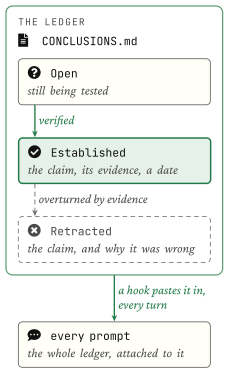
A claim moves from Open to Established when there is evidence for it, and to Retracted, with the reason, when evidence goes against it.
For the single-cell project it looks roughly like this:
## Established
- Cell-type labels come from the v2 annotations in exp-0007; v1 is superseded (exp-0007; 2026-05-20)

## Open
- Do the v2 labels hold up in the second batch?

## Retracted
- v1 annotations (exp-0004): several clusters mislabeled; results built on them discarded (exp-0007; 2026-05-20)
I think the Retracted section is the most useful of the three, and it is the one that is easiest to leave out. An appealing wrong idea tends to get rediscovered again and again (by agents and by tired people), and writing down that it was wrong, and why, is the only thing I have found that reliably stops that.
A file at the root doesn’t do anything by itself, though. The agent would have to decide to read it at the right moment, in the middle of a session about something else, which is exactly when it wouldn’t. So instead of waiting to be read, the file is added to every prompt automatically. That is done with a hook.
Instructions and hooks
Everything so far can be written as instructions, and for a while that is all it was: a block in my global ~/.claude/CLAUDE.md (the one that applies to every project, not the one-line file in the repository) saying read the map first, reuse src/, never write to the root, keep the conclusions file up to date. The agent followed these most of the time, and it is the rest of the time that bites. Instructions in a prompt make the right behavior more likely, but in a long session with a lot going on the agent will eventually do something else.
What has worked better for me, so far, is a hook. Claude Code lets you register small programs that run automatically at fixed points in a session 7 : when the session starts, when you send a message, before the agent uses a tool, and when it tries to finish. A hook is an ordinary bash or Python script. It gets a description of what is about to happen, and it can either add text to the agent’s context or block the action. The model can’t skip it, since the hook is just a program running around the model, not something the model is asked to do.
A hook reads a small JSON description of the event on stdin. Exit code 0 means go ahead (and whatever it prints can be added to the context). Exit code 2 means stop, and whatever it wrote to stderr is shown to the agent as the reason.
So the Lab Standard ended up in three layers, sorted by how easy each one is for the agent to ignore.
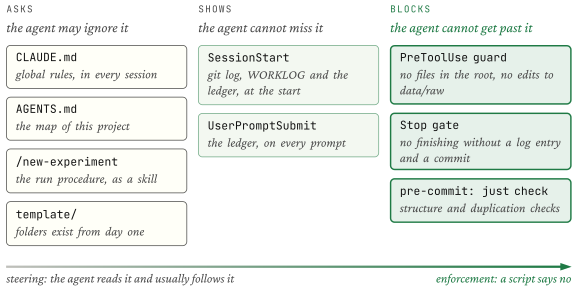
Left: things that are only asked for. Middle: project state that is shown to the agent whether or not it looks. Right: a few actions that are blocked outright.
The middle column is how the conclusions file reaches the agent. The UserPromptSubmit hook runs every time I send a message, and all it does is print the conclusions file, with a one-line reminder of the rule, into the agent’s context for that turn. Without the setup lines, it is this:
echo "- Do NOT contradict an Established conclusion without flagging it and re-deriving from evidence"
echo "  (if evidence overturns it, move it to Retracted THIS turn)."
if [ -f "$root/CONCLUSIONS.md" ]; then
  sed -n '1,90p' "$root/CONCLUSIONS.md"
fi
exit 0
With this in place, the annotation episode is much less likely, because “labels come from the v2 annotations in exp-0007; v1 is superseded” is at the end of the context, right next to the old file, on every turn. The agent can still disagree with it, and sometimes it should, but at least it has to notice that it is contradicting something. A similar hook at SessionStart adds the last fifteen git commits, the uncommitted changes, the end of WORKLOG.md (a dated, append-only log of what each session did) and the conclusions file, so a new session starts out knowing what happened yesterday and what was left unfinished.
Back in the mouse project, the right column is for the few things that must not happen at all. The PreToolUse hook runs before every file write and looks at the path. It lets almost everything through, but it refuses a new file in the repository root, any edit under data/raw/, and any new top-level folder that the map doesn’t list. When the agent tries to save usage_plot.py at the root, it gets back:
[Lab Standard] Blocked: don't create new files in the project root ('usage_plot.py').
Put run code/outputs in experiments/<exp-id>/ (use /new-experiment), reusable code in
src/, exploration in notebooks/. See AGENTS.md.
and it puts the file in an experiment folder instead, usually without any fuss. Blocking isn’t free, though. Every block wastes a step, and I suspect a setup that blocks too much just teaches people (and agents) to route around it. So I have kept the list of blocked actions short, limited to the few mistakes that are expensive to undo.
The guard only sees the agent’s file-editing tools. A file created through a shell command gets past it, which is why the same rules are checked again at commit time.
just check also runs automatically on every commit (through a tool called pre-commit). It checks the structural rules: every experiment has a README and a line in the index, nothing stray at the root, no copied functions. It is a plain script, so it is cheap to run and gives the same answer every time.
The last hook runs when the agent says it is done. The Stop hook checks whether any real files changed (scripts, data, figures, anything other than a markdown note), and if so it won’t let the session end until a dated entry has been added to WORKLOG.md and the work has been committed to git. The core of it is a few lines:
substantive="$(printf '%s\n' "$changed" | grep -v '\.md$' || true)"
[ -z "$substantive" ] && exit 0
if ! printf '%s\n' "$changed" | grep -Eq '(^|/)WORKLOG\.md$'; then
  echo "[FINISH gate] You changed files this session but did NOT update WORKLOG.md." >&2
  exit 2
fi
The commit part matters more than it might seem. Every manifest records a git commit, and a manifest that points to a commit that doesn’t contain the code that actually ran is arguably worse than no manifest, since it points you confidently at the wrong code. Requiring the commit before the session ends keeps git honest. (The hook also checks a flag that is set once it has already blocked, so it can’t trap a session in a loop, and if the hook itself hits an error it lets the session end instead of getting in the way.)
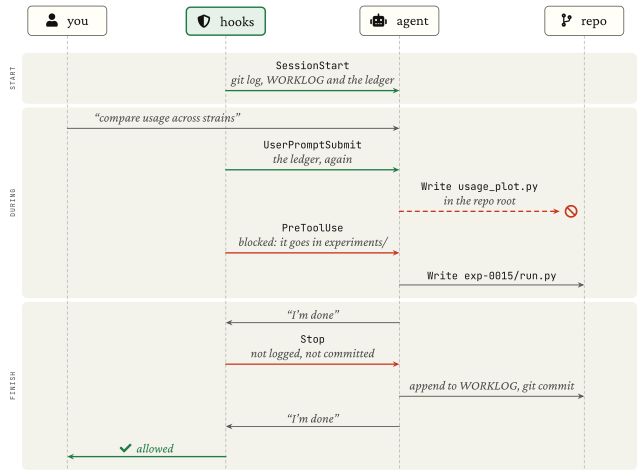
One session from start to finish. Each hook runs at a fixed point and either shows the agent something or stops it.
Running the same way locally and on the cluster
One smaller piece, because it removes a lot of “it worked on my laptop.” Model fits run on the cluster and quick checks run locally, and the command is the same in both places. just run exp-0012_h2-by-syllable runs it here, and just submit exp-0012_h2-by-syllable wraps the same command in a SLURM job, with the job’s log files written into the run folder and the job id recorded in the manifest. Code and config move between machines through git. The data stays on shared storage, referenced by a path in the config, and is never copied around.
Trying it
Everything above is in github.com/anshu957/lab-standard. Installing it takes two commands:
git clone https://github.com/anshu957/lab-standard.git ~/.claude/lab-standard
bash ~/.claude/lab-standard/install.sh
The script copies the hooks, the two skills and the CLAUDE.md block into ~/.claude (it makes backups first and is safe to run again). After restarting Claude Code, /new-project scaffolds a project in this layout and /new-experiment starts a run folder. It is written for my own work, so treat it as a starting point and change whatever doesn’t fit yours.
What it doesn’t fix
I should also say what this doesn’t do. It keeps the project readable, and it makes every result traceable to the code and data that produced it. It doesn’t make results correct. A perfectly recorded run with the wrong kappa is still a run with the wrong kappa, and if a wrong conclusion gets marked Established, the hook will faithfully show it to the agent on every turn until someone with evidence moves it. Surveys of scientists find that most failures to reproduce come from things like selective reporting and weak statistics 3 , and a folder layout doesn’t touch those. At best it means I can’t say I don’t know what I did (I can still be wrong, just in a well-documented way).
It also costs something to set up and maintain, and I am still changing parts of it. The part I am least sure about is the conclusions file. When a result from a few months ago and a new plot disagree and the evidence is honestly mixed, right now I decide by hand what gets written down, and I don’t have a good rule for that yet. If you have been doing something similar in your own projects, especially on that question, I would like to hear how you handle it.
References
- 1. (2017). Good enough practices in scientific computing . PLOS Computational Biology, 13(6), e1005510 ↩
- 2. (2013). Ten simple rules for reproducible computational research . PLoS Computational Biology, 9(10), e1003285 ↩
- 3. (2016). 1,500 scientists lift the lid on reproducibility . Nature, 533(7604), 452–454 ↩
- 4. (2024). Cookiecutter Data Science (v2) . Project documentation ↩
- 5. (2025). Effective context engineering for AI agents . Anthropic Engineering blog, 29 September 2025 ↩
- 6. (2025). AGENTS.md: an open format for guiding coding agents . agents.md ↩
- 7. (2025). Hooks reference (Claude Code documentation) . Claude Code docs ↩
- 8. (2024). Lost in the middle: How language models use long contexts . Transactions of the Association for Computational Linguistics, 12, 157–173 ↩
- 9. (2025). Context rot: How increasing input tokens impacts LLM performance . Chroma technical report, 14 July 2025 ↩
- 10. (2011). Documenting architecture decisions . Cognitect blog, 15 November 2011 ↩
- 11. (2015). Mapping sub-second structure in mouse behavior . Neuron, 88(6), 1121–1135 ↩
- 12. (2024). Keypoint-MoSeq: parsing behavior by linking point tracking to pose dynamics . Nature Methods, 21(7), 1329–1339 ↩